

Concepts
Architecture map
See which layer owns execution, state, rendering and discovery.
Use this map after the small Counter tutorial. You do not need to configure every layer to create a plugin.
BitaKit is a composition layer
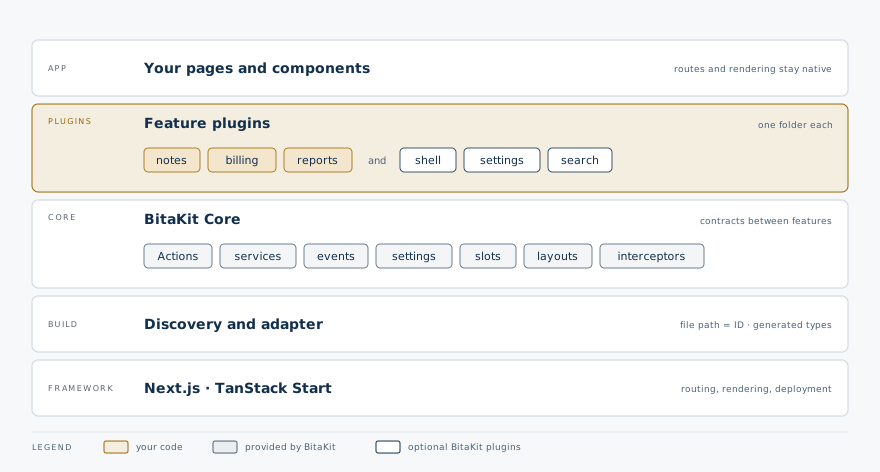
| Part | Owns | Does not own |
|---|---|---|
| Discovery | File parsing, generated imports/types and package metadata | Browser execution or runtime package installation |
| Core | Lifecycle, services, Action execution, events, Settings values and slot attachment | React or rendering |
| UI bindings | Reactive reads, bound controls, contextual slot selection | Product layout or a second value store |
| Shell / App Preferences | App frame, region outlets and Settings presentation | A second runtime or routing engine |
| Host | Composition, native routes, central theme and trusted server integration | Per-plugin bootstrap registries |
Read the flow you need
| Question | Diagram and example |
|---|---|
| How do files become a running plugin? | Discovery |
| How can several controls use one operation? | Action bindings |
| How does an operation update every control? | The Action loop |
| What can block an Action or observe its failure? | Action interception |
| How is service interception different? | Service observation |
| How do plugins notify each other? | Event delivery |
| How does UI follow changing values? | Service state |
| Who owns startup and cleanup? | Service lifecycle |
| What do starting, ready and stopping mean? | Runtime state chart |
| Where does a contributed widget appear? | Slots and layout anatomy |
| How does a declaration become a Settings page? | Settings |
| What survives a compatible plugin update? | Runtime management |
The diagrams describe this checkout's implemented APIs. They do not imply arbitrary hot code loading, server Action transports or a Harness layer. Exact guarantees and limits remain next to the examples in each guide. Use Patterns at a glance to choose a mechanism.