

Discovery and file conventions
Let the build generate imports and types from your plugin folders.
Owner: the Node-only @bitakit/discovery package. Framework adapters connect it to the build. Installing Core alone does not scan folders.
The folder is the feature's map for both developers and AI coding agents: each supported kind
has a predictable home, and generated types describe the resulting IDs. Prefer explicit code?
Programmatic composition uses the same define* helpers
and runtime without requiring this folder convention.
Start with one file
src/plugins/counter/ui/pages/index.tsx → /counterDiscovery connects this page without a registration file. As the feature grows:
services/value.ts     → services.counter.value
actions/increment.ts  → counter.increment
slots/toolbar.ts      → counter.toolbar
From files to a running plugin
Full folder reference
This is the complete reference of what discovery reads. Every entry is optional; most plugins use two or three of them, so start with the one-file plugin and come back here when a feature needs more.
src/plugins/todos/
├── services/list.ts          defineService   → services.todos.list
├── actions/add.ts            defineAction    → todos.add
├── events.ts                 defineEvents    → todos.changed
├── settings.ts               defineSettings  → settings.todos.pageSize (generated settings page)
├── slots/header.ts           defineSlot     → todos.header (owned contract)
├── configs/limits.ts         defineConfig    → app.config.todos.limits
├── interceptors/audit.ts     defineInterceptor
├── setup.ts                  plugin setup (optional)
├── plugin.config.ts          dependencies and metadata (optional)
├── locales/en.json           { "todos": { ... } }
└── ui/
    ├── pages/index.tsx       /todos          (file path = URL)
    ├── slots/app-bar.end.tsx component placed in slot "app-bar.end"
    ├── dialogs/rename.tsx    a component an action opens with `dialog`
    ├── settings/page.tsx     replaces the generated settings page
    └── providers/query.tsx   React provider wrapped around the app
Every immediate folder under src/plugins is a plugin; its folder name is the plugin ID. The kind comes from the folder, the name from the file path, and nested folders add segments (actions/bulk/archive.ts → todos.bulk.archive).
A small plugin can keep one file per kind instead of a folder. actions.ts exporting a record declares one Action per key, with the same IDs the folder would give:
import { defineAction } from '@bitakit/core';

export default {
  add: defineAction({ title: 'Add', execute: () => {} }), // todos.add
  clear: defineAction({ title: 'Clear', execute: () => {} }), // todos.clear
};
When the file grows, move each entry to actions/add.ts and actions/clear.ts; no ID changes. The same works for services.ts, interceptors.ts, configs.ts and slots.ts. Pages, slot components and providers stay under ui/, the only place that imports React. Root app contributions live in the same folders directly under src; their IDs carry no prefix (events and configuration use the app module ID: app.<name>).
A folder and a dot mean the same in a file path, so a flat layout works as well: actions.add.ts is actions/add.ts, Action todos.add. Folders are the default that bitakit add writes; flat files suit small plugins. Both may be mixed, but one ID needs exactly one file.
Legacy spellings
The add.action.ts suffix from 0.1 and the old pages/, views/ and providers/ folders are
still read with a warning. npx bitakit migrate upgrades a 0.1 project: it rewrites them and
moves dotted files into folders; --dry-run lists the changes first.
What is discovered
A TypeScript or TSX file participates when it has a default export; discovery detects the export with the TypeScript parser and never executes ordinary contribution modules. Manifests (plugin.config.ts) and bitakit.config.ts are loaded and must be trusted code. Files without a default export are reported as skipped; prefix helper files with - to silence that. Declaration files and anything under server/ are excluded. Under ui/, discovery reads pages/, slots/, providers/ and the special settings/page.tsx; other files, including dialogs, are ordinary components referenced by contributions. React imports belong under ui/.
| File | Meaning |
|---|---|
actions/add.ts | Action todos.add |
services/list.ts | Service todos.list, reached as services.todos.list |
events.ts | The plugin's events, todos.<name> |
settings.ts | The plugin's settings, todos.<name>, shown on a generated settings page |
ui/settings/page.tsx | Replaces the generated settings page of the plugin |
configs/limits.ts | Config subtree limits; configs/actions/add.ts configures todos.add |
interceptors/audit.ts | Interceptor, plugin-local by default |
ui/pages/[id].tsx | Page /todos/:id, receives params.id |
ui/slots/app-bar.end.tsx | Component in slot app-bar.end |
ui/providers/query.tsx | React provider todos.query |
A default export may also be a record of definitions (actions/index.ts exporting { add, clear } equals two files). Duplicate logical paths are errors that name both files. Class and factory action exports are not discovered.
Automatic loading, step by step
- The framework adapter (
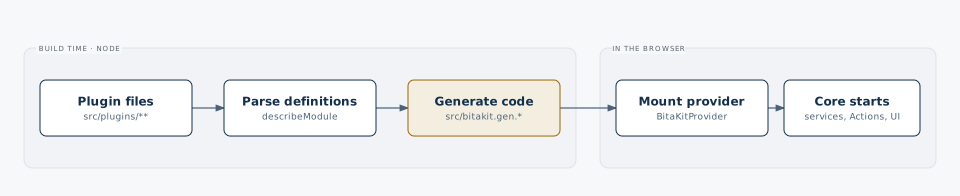
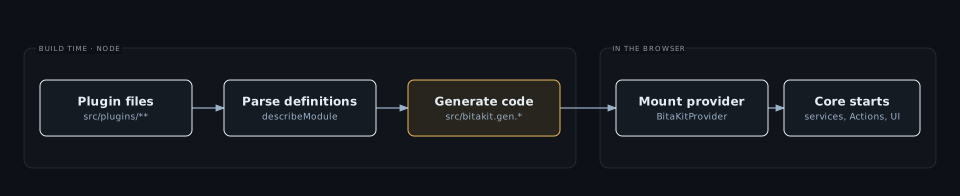
withBitaKitinnext.config.ts,bitakit()invite.config.ts) runs discovery before the build and watches during development. - Discovery writes
src/bitakit.gen.tsx(the React provider) andsrc/bitakit.gen.config.ts(createBitaKitConfig()and the typed maps),src/bitakit.gen.css(styles of installed packages) andsrc/bitakit.gen.messages.json(plugin locales). - The root layout renders
<BitaKitProvider>from@/bitakit.gen, which mounts the runtime. - Core creates the services, registers the actions and installs interceptors and UI.
- Bindings read the live action state and service stores.
Ignore src/bitakit.gen.* in Git. Production changes require a new build. Browser code never scans the filesystem. Automatic registration does not create a route or render a menu by itself; a page comes from ui/pages, a navigation entry needs a URL Action placed in the owner's slot, for example slots: ['shell.navigation'].
npx bitakit info lists what discovery finds; npx bitakit doctor checks the wiring, pages, links, service names and styles; npx bitakit generate [--watch] runs the generator by hand.
Nested plugins
A large feature can be split into child plugins. A folder inside a plugin becomes a child
plugin when it has its own plugin.config.ts; without one it stays an ordinary part of the
plugin around it.
src/plugins/crm/
├── services/accounts.ts        crm.accounts
├── deals/
│   ├── plugin.config.ts        a child plugin with the ID "deals" (or the manifest's id)
│   └── services/pipeline.ts    deals.pipeline
└── import/csv.ts               no manifest: still part of crm
Discovery sets the child's parent to the plugin folder around it. The parent is also a
dependency: it starts first, and a child cannot run while its parent is disabled. Disabling or
removing the parent includes all of its descendants; disabling one child leaves the parent and
siblings running. Plugin IDs stay globally unique, so a child is addressed by its own ID
(deals.pipeline), not by its path. The plugin manager
describes the lifecycle rules.
plugin.config.ts and bitakit.config.ts
plugin.config.ts is optional. It declares dependencies, display metadata, an id other than the folder name and entries that relocate a kind. In a nested folder its presence makes a child plugin, and it may name a different parent. Discovery derives everything else.
An entries path stays inside the plugin directory; symlinks are rejected. false
disables that kind. The app module uses the same conventions directly under src/;
its native framework routes remain app-owned. Page files may export layout (app by
default, blank for a bare page). UI providers may export requires to declare ordering.
Plugin messages live in locales/<lang>.json under their own namespace. Discovery rejects
out-of-namespace keys and merges the catalogs into bitakit.gen.messages.json; the host's
translation provider consumes that generated catalog.
bitakit.config.ts configures discovery for the whole app:
import { defineBitaKit } from '@bitakit/discovery';

export default defineBitaKit({
  configOverrides: { todos: { limits: { maxItems: 50 } } },
  actions: { overrides: { 'todos.clear': { enabled: false } } },
  plugins: { overrides: { demo: { enabled: false } }, include: { notes: '../notes/src' } },
  packages: { '@bitakit/quick-search': false },
  slots: ['dashboard.content'],
});
Other options: directory and plugins.directory move the roots, plugins.autoEnable: false turns plugins off unless enabled, interceptors.enabled selects app interceptors, strict: false allows unknown action IDs, groups declares action groups and kinds adds integration contribution kinds. See overrides.
Installed packages
A package becomes a plugin by declaring bitakit: { plugin: './plugin' } in its package.json. Direct dependencies and the plugin packages they depend on are activated; the package's styles join bitakit.gen.css. bitakit build produces that entry from the same folders apps use, so a plugin can move between src/plugins/<id> of an app and src/ of a package unchanged. Installing an arbitrary npm dependency does not activate it.
Use manual composition when you do not have a discovery-enabled host, and read type safety for the generated contracts.
Declare extension points
// src/plugins/shell/slots/header/actions.ts
import { defineSlot } from '@bitakit/core';
export default defineSlot({ accepts: 'actions', policy: 'list' });slots/header.actions.ts, slots/header/actions.ts, slots/header/index.ts exporting
{ actions: defineSlot(...) }, and manual slots: { header: { actions: defineSlot(...) } }
produce the same shell.header.actions contract. Choose one spelling; duplicate declarations
are errors. App-root names have no prefix, except events and configuration, which use the app module ID (app.<name> by default), because an event's first segment names its owner. Explicit IDs are absolute; manual arrays need IDs.
| Field | Contract |
|---|---|
accepts | actions, component, or data (with schema) |
payload | Existing zod/Standard Schema describing context from the owner |
policy | list by default, single, or keyed; conflicting occupants never silently replace |
Generated SlotMap carries definition types. SlotPayload<'name'> and SlotData<'name'>
expose the schema outputs; both also accept a definition type directly. Core keeps components
opaque and has no React dependency. runtime.modules[].slots exposes declared inventory.
Declarations alone do not render anything or mark their owner ready. Actions place themselves
with slots; slot bindings render the current attachments. Legacy config/manifest slot
names remain LegacySlotMap hints, not owned contracts. Declared component targets now
use the scope-owned attachment path with wait by default; files can export id/key/order/availability.
Hiding an outlet does not remove its contributions. Doctor reports readable contracts,
duplicates and unresolved expressions; it cannot prove that an outlet is mounted.
Use bitakit add slot-definition shell/header/actions for a declaration. bitakit add slot
still creates a component contribution. Built packages include types and a generated
plugin.slots.json beside the entry for static inspection; source remains the authority.
Development refresh
Framework hosts generate a component-only bitakit.gen.tsx and a client-side
bitakit.gen.config.ts for configuration/type maps. Normal hosts keep importing
BitaKitProvider from bitakit.gen. Advanced consumers that previously imported
createBitaKitConfig there now import it from bitakit.gen.config. Without a framework,
bitakit.gen.ts remains the configuration entry. Do not hand-edit generated files.
The watcher writes complete files atomically and regenerates promptly on filesystem renames. A watch session reuses its audited installed-package graph for local source-only changes; package metadata, configuration selection, styles and external watched files invalidate it. The cache contains package discovery results, never application values or a second runtime.
Next development checks cover add/edit/delete, whole-plugin removal and collection leaf removal,
with a preserved document token and page draft. This is bundler Fast Refresh followed by an
awaited composition replacement, not reconcilePlugins or arbitrary code hot replacement.
Affected slot/form state can remount during composition replacement; compatible explicit
runtime updates retain the documented owner-specific guarantees. Named components are the supported
React refresh path. Structural provider changes, server code, dependency installation and
changes outside a React refresh boundary can require a host restart/reload. Restart the dev
server after changing Node-loaded generator/integration code. No universal HMR promise.