

Plugin manager
Add a Notes feature, disable it, enable it again and remove it without replacing the app.
Use the Plugin manager when you already have a plugin definition and want to change its lifetime in a running app. Core starts and stops its services, Actions and contributions; unrelated features keep their existing instances.
This guide follows one Notes plugin through that lifecycle. For choosing and loading its code from a trusted catalog, continue with Package manager. These APIs describe the 0.2 checkout; use the local package setup for changes that have not been published yet.
Plugin manager
| Operation | What happens to Notes? |
|---|---|
| Add | Its definition is registered and its services and Actions start. |
| Disable | Its running resources stop; the definition, setting values and event/slot contracts remain. |
| Enable | Its services start again from the retained definition. |
| Remove | Its resources stop and its declarations are released. Saved setting records are not deleted. |
Add, disable, enable and remove a plugin
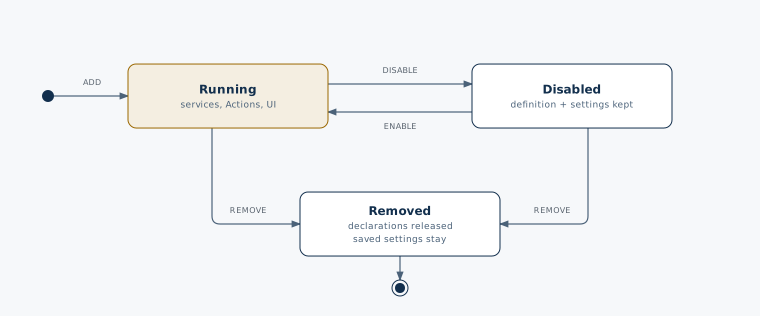
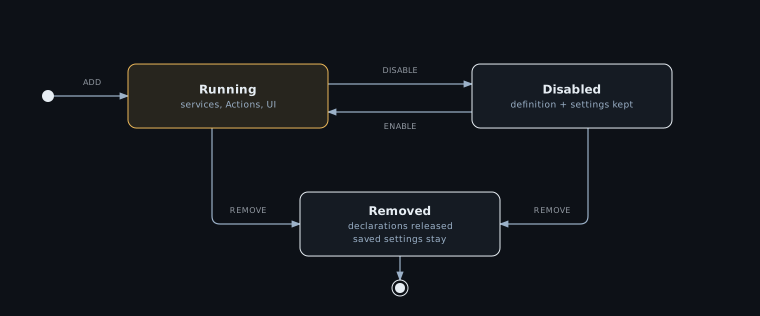
Disable is not a pause of JavaScript memory: enabling creates fresh service instances. Persist important documents separately. Retained Settings and an in-memory notebook have different lifetimes.
1. Define a small Notes plugin
Create notes-plugin.ts. This standalone TypeScript example uses explicit composition so you
can run it without a framework or discovery. The factory returns definitions; it does not start services.
import { defineAction, definePlugin, defineService, defineSettings, setting } from '@bitakit/core';
import type { ActionSignature, SettingsOf } from '@bitakit/core';

type Note = { title: string };

const notebook = defineService(({ store }) => {
  const notes = store<Note[]>([]);
  return {
    ...notes,
    add() {
      notes.set((items) => [...items, { title: 'Untitled note' }]);
      return notes.get().length;
    },
  };
});

const add = defineAction({
  title: 'Add note',
  description: 'Create an untitled note in the current notebook.',
  execute: ({ services }) => services.notes.notebook.add(),
});

const preferences = defineSettings(
  {
    pageSize: setting({ default: 10, label: 'Notes per page' }),
  },
  { title: 'Notes' },
);

// Manual composition supplies the type maps normally generated by Discovery.
declare module '@bitakit/core' {
  interface ServiceMap {
    'notes.notebook': ReturnType<typeof notebook.create>;
  }
  interface ActionMap {
    'notes.add': ActionSignature<typeof add>;
  }
  interface SettingsMap extends SettingsOf<typeof preferences, 'notes'> {}
}

export function createNotesPlugin() {
  return definePlugin({
    id: 'notes',
    services: { notebook },
    actions: { add },
    settings: preferences,
  });
}
The service owns the notes. The Action calls that service and returns the new count. The
setting declares a default; a list UI would read it to decide how many notes to display.
The IDs are notes, notes.notebook, notes.add and notes.pageSize.
The type maps derive service, Action and setting types from their definitions. They do not
register anything at runtime. In a discovered app these maps are generated for you; see
Type safety.
2. Add, use, disable and remove it
Create plugin-demo.ts next to the definition. With the matching @bitakit/core installed,
use Node.js 24 and "type": "module" in your project's package.json, then run
node plugin-demo.ts. Node runs these files by stripping TypeScript syntax; use your project's
TypeScript check separately. The assertions show the expected result of each operation and
stop the example if a change fails.
import assert from 'node:assert/strict';
import { createRuntime } from '@bitakit/core';
import { createNotesPlugin } from './notes-plugin.ts';

const runtime = createRuntime({ plugins: [] });
const stop = runtime.mount();

try {
  await runtime.ready;

  const added = await runtime.plugins.add([createNotesPlugin()]);
  assert.equal(added.status, 'applied');
  const created = await runtime.actions.execute('notes.add');
  assert(created.status === 'completed');
  assert.equal(created.value, 1);
  await runtime.settingsAccess.notes.pageSize.set(20);

  const disabled = await runtime.plugins.disable('notes', { dependents: 'refuse' });
  assert.equal(disabled.status, 'applied');
  assert.equal(runtime.isReady('notes'), false);
  assert.equal(runtime.settingsAccess.notes.pageSize.get(), 20);

  const enabled = await runtime.plugins.enable('notes');
  assert.equal(enabled.status, 'applied');
  // A new service instance starts with an empty in-memory notebook.
  const recreated = await runtime.actions.execute('notes.add');
  assert(recreated.status === 'completed');
  assert.equal(recreated.value, 1);

  const removed = await runtime.plugins.remove(['notes'], { dependents: 'refuse' });
  assert.equal(removed.status, 'applied');
  assert.equal(runtime.actions.get('notes.add'), undefined);
  assert.equal(runtime.settings.has('notes.pageSize'), false);

  console.log('Notes added, disabled, enabled and removed.');
} finally {
  await stop();
}
Expected result: the final message appears without an assertion failure. The Action works while Notes is enabled, its notebook starts fresh after re-enabling, and the setting value survives disable/enable. Removing the plugin removes the Action and the setting declaration.
This script creates a runtime because it is standalone. In a configured React app, the
existing provider already owns it. Host management components can access that same runtime
through useBitaKit() from @bitakit/ui; do not mount a second runtime. Keep management
outside the affected plugin's Actions, setup/start hooks and disposers.
What changes in the app UI?
The example above is headless. A visual plugin uses the same lifecycle and adds ordinary page, Action placement and Settings declarations. Those need their corresponding host renderers:
| Declaration in the plugin | Existing host renderer | When the plugin is active |
|---|---|---|
A page at /notes | PluginPage on the plugin route | The Notes page can render. A page alone does not create a navigation link. |
An Action with href: '/notes' and slots: ['shell.navigation'] | Shell's navigation | A Notes link appears in the sidebar. |
An Action with slots: ['shell.toolbar'] | Shell's toolbar | An Add note control appears. |
defineSettings(...) | App Preferences | Notes gets a Settings page and navigation entry. |
Disabling or removing the owner releases its active contributions. A matched unavailable page uses the host's unavailable behavior. Unrelated pages keep their state; affected pages and Settings projections can remount. See Add a page, Action placement and Settings for the file-based UI examples.
Dependencies and cleanup
Suppose a Search plugin declares a dependency on Notes. Disabling Notes with
{ dependents: 'refuse' } returns blocked while Search is enabled. Using
{ dependents: 'stop' } also disables Search. To restore both, enable Notes first and Search
second. Consumers do not re-enable automatically.
The affected set includes declared plugin dependencies, required-service consumers and scopes that read the composition, such as App Preferences. Removal also includes contributors to the removed owner's slots. Actions are cancelled and drained, contributions are revoked, and cleanup finishes before declarations are released.
Parents and children
A plugin can own others: discovery sets parent for a nested plugin folder,
and definePlugin({ id, parent }) does the same in code. Ownership is stronger than a
dependency:
| Operation | What happens |
|---|---|
| Start | The parent starts before its children; a child whose parent is missing fails at startup. |
disable(parent, …) or remove([parent], …) | All descendants follow, even with { dependents: 'refuse' }; they stop before the parent. Plugins outside the subtree that depend on them follow the dependents policy. |
disable(child, …) | Only the child (and its own dependents); the parent and siblings keep running. |
enable(child) while the parent is disabled | blocked: enable the parent first. |
enable(parent) | Restores the descendants its disable switched off. A child you disabled on its own stays disabled. |
Only one lifecycle operation runs at a time. Await each result before starting the next. An operation must not await the same Action or hook that called it.
Outcomes and recovery
In an app, show the operation's actual status and useful reasons through your management
UI. The script's assertions are demonstration checks, not a production error interface.
| Result | Meaning and response |
|---|---|
applied | The operation completed. Disabled or removed plugins are correctly not ready. |
blocked | Check dependencies, declarations, active operations and earlier cleanup failures. Resolve the cause before retrying. |
failed | Startup or cleanup failed. Inspect lifecycle to decide whether clean recovery is possible. |
restart-required | The plugin shape needs host composition replacement instead of this targeted operation. |
A failed start can be retried with enable after clean teardown. Failed cleanup blocks further
mutation. Pending setting writes block removal, including a second check after awaited cleanup.
If a write starts during cleanup, affected owners remain blocked with their declarations retained;
await the write, then retry removal or explicitly enable the owner. External effects are not
rolled back automatically.
What can change live
| Plugin shape | add · remove · enable · disable |
|---|---|
Services, Actions, slots (including data and component slots), settings, events, pages, setup | applied |
| A plugin whose affected set includes UI providers or layouts | restart-required |
| A plugin with interceptors | restart-required |
A custom contribution kind: its owner (installs) or a contributor (contributions) | restart-required |
The provider of auth, i18n or settings.storage, or the app module | restart-required (the app module is blocked) |
The affected set includes dependents and composition readers, so an ordinary plugin's change is
restart-required when one of them has such a shape. To make an extension switchable live, build
it from the first row: for example, the host declares a keyed data slot with a schema and keyed
component slots, and each extension attaches its data in setup with scope.slots.attach and
its components in ui/slots/. Removing the extension removes its attachments with its scope.
The host may replace its runtime for the restart-required cases; these operations do not
restart the website's server.
For compatible changes to an existing implementation, use Runtime management. File HMR and plugin lifecycle changes are separate mechanisms.
Inspect plugins
Use inspectRuntime(runtime) or observeRuntimeInventory(runtime) from @bitakit/core for
plugin inventory. React hosts can use useRuntimeInventory() from @bitakit/ui.
Disabled installed definitions remain visible; readiness comes from the current lifecycle.
See Shared inspection schema for the fields shared by runtime inspection, Devtools, App Preferences and the CLI.
Load plugins from packages
The Package manager loads trusted definitions and owns their active selection through this same lifecycle. Manage its plugins through that adapter rather than also changing them with direct Core calls. Installation persistence, server authorization and a marketplace interface remain separate host work.