

Package manager
Define a trusted catalog, activate a Notes package and release it from a running app.
The Package manager answers two questions: which packages may this app load, and which
of them should be active now? The operator supplies a catalog; the host supplies an authorized
selection. @bitakit/packages loads the selected definitions and delegates their lifetime to the
Plugin manager.
This guide reuses the small Notes definition from that chapter. These APIs describe the 0.2 checkout; use the local package setup for unpublished changes.
A trusted catalog becomes an active feature
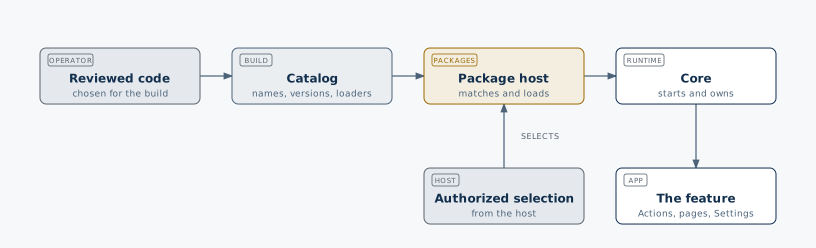
What does trusted mean?
A trusted catalog is an explicit allowlist of code reviewed and included by the app's operator. Each entry defines a name, an exact version and a loader. The user chooses entries; the user does not supply loader code or a URL. Trusted plugins execute with the host's JavaScript access.
| Part | Who supplies it? | Notes example |
|---|---|---|
| Catalog name | Operator/build | notes-example |
| Allowed version | Operator/build | 1.0.0 |
| Loader | Operator/build | A literal import of the Notes module |
| Active selection | Host, after authorization | Name and version from that catalog |
| Scope | Host | A generation key for the current preview or authorized context |
There is no trustedHosts or trustedSources URL option today. Trust is configured by
choosing catalog entries, not by allowing every script from a domain. There is no runtime
remote-download, signature-verification or sandbox mechanism. Adding a URL to a selection
cannot turn it into a loader.
1. Define a trusted catalog
There are two supported ways. Use Discovery in a normal generated app; use an explicit catalog for manual composition or the runnable example below.
Generate it from installed packages
For your own built and installed plugin package named notes-plugin, select it in
bitakit.config.ts. This name is illustrative; use the actual name of your package.
import { defineBitaKit } from '@bitakit/discovery';

export default defineBitaKit({
  catalog: ['notes-plugin'],
});
Discovery exports packageCatalog from src/bitakit.gen.config.ts in a generated React app
(or src/bitakit.gen.ts in a plain host). It takes the version from the installed package and
emits a literal lazy import of its public plugin factory. Never edit these generated files.
Catalog entries are omitted from initial startup. Type maps and audited CSS remain included
in the build. Other discovered plugins keep their configured startup behavior: catalog is
an allowlist for this package manager, not a global blocklist for all app code. Packages must
follow the Discovery contract; host-configured packages remain eager.
Adding an entry or changing a package version requires a new build.
Define it explicitly
For a small runnable example, put this file next to the notes-plugin.ts definition from
Plugin manager:
import type { PackageCatalog } from '@bitakit/packages';

export const packageCatalog = {
  'notes-example': {
    version: '1.0.0',
    load: async () => {
      const { createNotesPlugin } = await import('./notes-plugin.ts');
      return [createNotesPlugin()];
    },
  },
} satisfies PackageCatalog;
Here, notes-example is a catalog key chosen by the operator; the module is delivered locally
with the host. It does not need to be downloaded or published to run this example. For an
installed npm package, its loader would instead import the package's fixed public plugin entry.
Generated catalogs handle that import for you.
A loader returns fresh plugin definitions, possibly more than one. Services start through Core, not inside the loader. Module top-levels and factories must not start external work. Use a literal import known to the build rather than constructing an import path from user input.
2. Activate Notes and use its Action
With matching @bitakit/core and @bitakit/packages installed, create package-demo.ts
beside the two example files. Use Node.js 24 with "type": "module" in your project's
package.json, then run node package-demo.ts. Run your TypeScript check separately;
Node strips types when executing these files.
import assert from 'node:assert/strict';
import { createRuntime } from '@bitakit/core';
import { createPackageHost } from '@bitakit/packages';
import { packageCatalog } from './trusted-catalog.ts';

const runtime = createRuntime({ plugins: [] });
const stop = runtime.mount();

try {
  await runtime.ready;
  const packages = createPackageHost({ runtime, catalog: packageCatalog });
  const scope = 'preview-session-1';

  const activated = await packages.reconcile({
    scope,
    packages: [{ name: 'notes-example', version: '1.0.0' }],
  });
  assert.equal(activated.status, 'applied');
  assert.equal(runtime.isReady('notes'), true);
  const created = await runtime.actions.execute('notes.add');
  assert(created.status === 'completed');
  assert.equal(created.value, 1);

  // Inspect actual owned plugins, not just the requested selection.
  assert.equal(packages.get().packages[0].plugins[0].id, 'notes');
  assert.equal(packages.get().packages[0].plugins[0].ready, true);

  // Select nothing: release this adapter's packages after awaited cleanup.
  const released = await packages.reconcile({ scope, packages: [] });
  assert.equal(released.status, 'applied');
  assert.equal(packages.get().packages.length, 0);
  assert.equal(runtime.actions.get('notes.add'), undefined);

  console.log('Notes loaded, used and released through the trusted catalog.');
} finally {
  await stop();
}
Expected result: Notes is absent at startup, its Action works after activation, and the
Action disappears after release. The final message appears without an assertion failure.
The catalog name notes-example and the plugin ID notes intentionally differ: a package
can supply several plugins with their own IDs.
This script owns a standalone runtime. In a configured app, pass the existing mounted runtime
instead. In a React host, useBitaKit() from @bitakit/ui exposes it. Keep one adapter per
runtime in host management code, outside the affected plugins' Actions, hooks and disposers.
Do not recreate it on every React render.
With the generated catalog, the same adapter setup uses:
import { createPackageHost } from '@bitakit/packages';
import { packageCatalog } from './bitakit.gen.config';

const packages = createPackageHost({ runtime, catalog: packageCatalog });
Select the generated key and its recorded version, for example
{ name: 'notes-plugin', version: packageCatalog['notes-plugin'].version }.
3. Understand the selection
reconcile({ scope, packages }) receives the complete desired active list, not one
incremental install command. Keeping a name in the list keeps its healthy plugin instances;
removing it from the list requests cleanup. An empty list releases everything owned by this
adapter. Unrelated host plugins stay mounted.
| Requested selection | Result, after success |
|---|---|
| Notes | Notes is active. |
| Notes again, same scope/version | The healthy existing Notes instances are retained. |
| Notes plus another catalog package | Both packages are active; both must be trusted entries. |
| Only the other package | Notes is released. |
| Empty list | All packages owned by this adapter are released. |
Every package must supply disjoint plugin IDs. Shared dependencies belong in the host or in one separately selected package. Removing a package refuses enabled external dependents; include managed dependents in the removal or arrange their lifetime first.
Removing a package from this active list releases its definitions. This differs from the Plugin manager's disable operation, which retains definitions and setting values. Manage adapter-owned plugins through this adapter only; do not also disable or remove them through direct Core calls or a second adapter.
What happens to an untrusted request?
Run these examples while Notes is active, before the release step in the demo:
const unknown = await packages.reconcile({
  scope,
  packages: [{ name: 'another-package', version: '1.0.0' }],
});
assert.equal(unknown.status, 'blocked');

const wrongVersion = await packages.reconcile({
  scope,
  packages: [{ name: 'notes-example', version: '2.0.0' }],
});
assert.equal(wrongVersion.status, 'blocked');
assert.equal(runtime.isReady('notes'), true);
Neither request calls a new loader or removes the active Notes package. Unknown names, unavailable versions and duplicate selections are rejected before ownership changes. A URL string is likewise an unknown name unless the operator explicitly used that exact string as a catalog key; even then it would use the operator's loader, not import that URL automatically.
This check is not server authorization. A valid catalog entry only means the code is trusted; it does not establish which user or organization may activate it or access its data.
Scope changes and authorization
scope identifies one host-controlled lifetime. The preview uses a fixed demo value. In a
product, the host supplies an opaque generation key for its verified context and a selection
that has already passed its server authorization rules. A client-provided organization ID or
scope string is not proof of membership or permission.
A changed scope releases old managed plugins before activating the next selection, even if both scopes choose Notes. Hide the outgoing scope, await a successful switch, then reveal the new one. A failed switch reports the actual scope still owned by the adapter.
The manager does not store installation records or provide server permission checks. Those remain host responsibilities; the example does not implement organization or user installation persistence.
Outcomes and recovery
Package results include the Core outcomes and
superseded, which means a newer selection replaced a pending request. Inspect status,
reasons, the actual returned scope and packages.get() before reporting success.
Late import results cannot register plugins after their selection is superseded. Native module
evaluation cannot be cancelled. Calls during an active Core lifecycle operation return
blocked; retry after it settles.
Loading, removal and startup are not an atomic transaction. Removed plugins are not silently restored. After a clean startup failure, reconcile the same selection to retry; failed cleanup blocks reuse. The Plugin manager describes plugin shapes that require composition replacement.
What unloading releases
| Released by cleanup | Retained or outside this manager |
|---|---|
| Owned service instances and lifecycle resources | Evaluated JavaScript in the platform's module cache |
| Owned Actions, listeners and slot attachments | Shared eager CSS and catalog type maps |
| Plugin declarations, after successful removal | Persisted setting records and external data |
There is one allowed version per catalog name in a host build. Runtime package upgrades, remote downloads, domain allowlists, signature checks, untrusted-code isolation and a marketplace UI are not included. New catalog code or versions require a new build, while activating an existing supported entry does not require restarting the website server.