

3. Add state
Give the Counter a value and one operation.
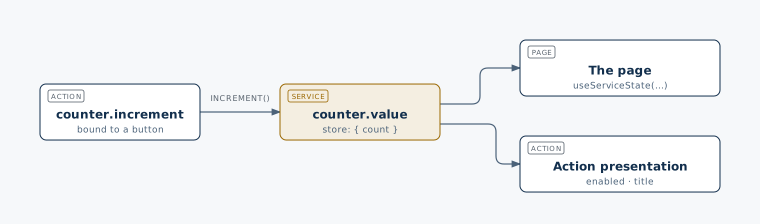
Continue with the Counter page. A service owns data and behavior that multiple components or Actions can share. Here it keeps the count in one place, so the page and button use the same value.
1. Add a service
Create src/plugins/counter/services/value.ts:
import { defineService } from '@bitakit/core';

export default defineService(({ store }) => {
  const state = store({ count: 0 });
  return {
    state,
    increment: () => state.set((s) => ({ count: s.count + 1 })),
  };
});
store holds the current value. increment is the only operation so far.
The path names this service counter.value.
2. Display its value
Replace src/plugins/counter/ui/pages/index.tsx with:
'use client';
import { useServiceState } from '@bitakit/ui';
import { PageHeader } from '@bitakit/ui/components';

export default function CounterPage() {
  const count = useServiceState('counter.value', (state) => state.count, 0);
  return (
    <>
      <PageHeader title="Counter" />
      <output>{count}</output>
    </>
  );
}
You should see 0. The final 0 is the fallback while the service starts.
The hook follows the store and releases its subscription when the component unmounts.
One store, several readers
3. Know what survives
This example stores the count in memory. A full page reload starts it at zero again. The next lesson adds a button so you can change it.
What you have now
- This step gave you shared state at
services.counter.value. Pages follow it withuseServiceState; Actions and other services call its methods. - Others extend it by reading or calling
services.counter.valuefrom their own Actions and services, instead of keeping a second copy of the count.
Next: Call increment from an Action →
Later: dependencies and resources
A service can use other services, load data during startup or release a connection during shutdown.
Those features are optional. See the service reference when your
service needs requires, onStart, onStop or a shared contract.