

Add settings
Declare saved preferences once, get a generated Settings page, read and write them from pages, Actions and services.
Goal: a Greeting page controlled by settings the user changes on a Settings page, on the page itself or through an Action, and that survive a reload.
You need an app with Settings (@bitakit/app-preferences), included in the create-app
default. The finished code is the Settings sample.
Declare the settings
One file per plugin. Each setting() needs a default; the control follows from it (a
boolean is a switch, options a select) unless you set control.
import { defineSettings, setting } from '@bitakit/core';

// One declaration: typed keys (`greeting.name`, ...), saved values and the /settings/greeting page.
export default defineSettings(
  {
    name: setting({ default: 'friend', label: 'Your name' }),
    formal: setting({
      default: false,
      label: 'Formal greeting',
      description: 'Use "Good day" instead of "Hello".',
    }),
    language: setting({
      default: 'en',
      label: 'Language',
      options: [
        { value: 'en', label: 'English' },
        { value: 'de', label: 'German' },
        { value: 'es', label: 'Spanish' },
      ],
    }),
    size: setting({
      default: 'medium',
      label: 'Text size',
      control: 'radio',
      options: [
        { value: 'small', label: 'Small' },
        { value: 'medium', label: 'Medium' },
        { value: 'large', label: 'Large' },
      ],
    }),
  },
  { title: 'Greeting', description: 'How the greeting page talks to you.', order: 10 },
);
Run npm run typecheck. Settings → Greeting (/settings/greeting) now exists, with a
field for each setting and the standard saving and reset behavior.
Read them on a page
useSetting(key) returns the current value and re-renders when it changes. Keys are typed.
SettingField renders the standard labelled field anywhere.
'use client';
import { Action, useSetting } from '@bitakit/ui';
import { Button, PageHeader } from '@bitakit/ui/components';
import { SettingField } from '@bitakit/app-preferences';

const words = {
  en: { informal: 'Hello', formal: 'Good day' },
  de: { informal: 'Hallo', formal: 'Guten Tag' },
  es: { informal: 'Hola', formal: 'Buenos días' },
} as const;
const sizes = { small: 'text-base', medium: 'text-2xl', large: 'text-4xl' } as const;

export default function GreetingPage() {
  const name = useSetting('greeting.name').value;
  const formal = useSetting('greeting.formal').value;
  const language = useSetting('greeting.language').value;
  const size = useSetting('greeting.size').value;
  const company = useSetting('companyName').value;
  return (
    <>
      <PageHeader
        title="Greeting"
        subtitle={`Settings decide every word. Brought to you by ${company}.`}
      />
      <p className={sizes[size]}>
        {words[language][formal ? 'formal' : 'informal']}, {name}!
      </p>
      {/* The standard labelled field, outside /settings: same value, same saving. */}
      <SettingField settingKey="greeting.formal" />
      <div className="flex gap-2">
        <Button asChild variant="outline">
          <a href="/settings/greeting">All greeting settings</a>
        </Button>
        <Action id="greeting.reset">
          <Button variant="ghost" />
        </Action>
      </div>
    </>
  );
}
Write them from an Action
Actions and services receive settings. set() and reset() save and update every reader.
import { defineAction } from '@bitakit/core';

export default defineAction({
  title: 'Reset greeting settings',
  // Actions read and write settings directly; every bound control and page updates.
  execute: async ({ settings }) => {
    await Promise.all([
      settings.greeting.name.reset(),
      settings.greeting.formal.reset(),
      settings.greeting.language.reset(),
      settings.greeting.size.reset(),
    ]);
  },
  success: 'Greeting settings reset',
});
In a service, read with settings.greeting.formal.get() inside a method, not in the factory
body: values load after the factory runs.
Add an app-wide setting
src/settings.ts holds settings that belong to the app, not to one plugin. Their keys stay
plain: companyName.
import { defineSettings, setting } from '@bitakit/core';

// App-wide settings keep plain keys: `useSetting('companyName')`, `settings.companyName`.
export default defineSettings(
  {
    companyName: setting({ default: 'Acme', label: 'Company name' }),
  },
  { title: 'Company', order: 0 },
);
Change the page body (optional)
ui/settings/page.tsx replaces the generated body and keeps the URL and navigation.
renderField keeps the standard control, saving state and reset.
'use client';
import type { ReactNode } from 'react';
import type { SettingsCatalogField, SettingsCatalogSection } from '@bitakit/app-preferences';

// Replaces the body of the generated /settings/greeting page; URL and navigation stay.
export default function GreetingSettingsPage({
  section,
  renderField,
}: {
  section: SettingsCatalogSection;
  renderField: (field: SettingsCatalogField) => ReactNode;
}) {
  return (
    <>
      <p className="text-sm text-muted-foreground">
        These choices are saved in this browser. Open the Greeting page to see them applied.
      </p>
      {section.fields.map(renderField)}
    </>
  );
}
Check it
- Turn on Formal greeting on the Greeting page: the text becomes "Good day, friend!".
- In All greeting settings, set your name and Large, then reload: the choices stay.
- Press Reset greeting settings.
Know where values are saved
One declaration, one value owner
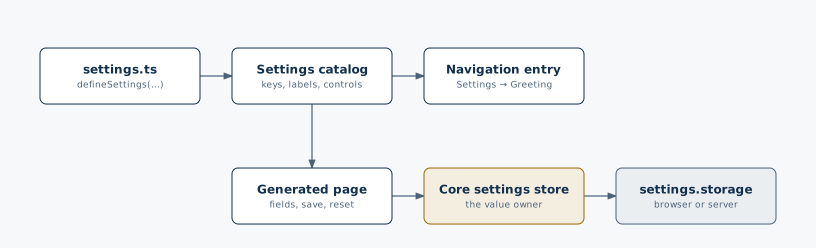
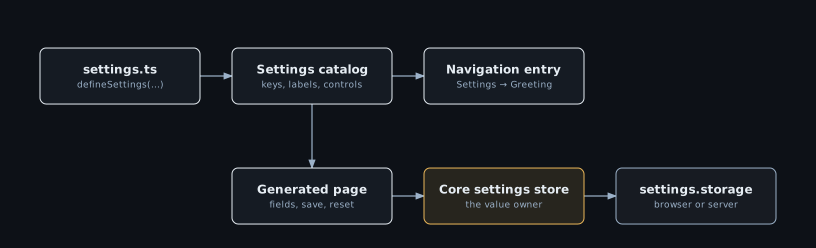
Values are saved in the browser by default, per browser and per signed-in user. To save them
on a server, add one service that provides the settings.storage contract; your settings.ts
files stay unchanged. See the Settings reference and the
Counter lesson on preferences.
| Need | Option |
|---|---|
| A value per device, not per user | scope: 'device' |
| A team-wide value | scope: 'organization' (with organizations installed) |
| Validation | schema with zod or another Standard Schema |
| A setting only code uses | hidden: true |
| Group fields on the page | group and order |