

Use a custom layout or screen
Give sign-in, onboarding or landing pages their own frame, and replace the not-found and error screens, each with one file.
Goal: a sign-in page in your own split frame, an onboarding page without the navigation, and your own "page not found" and "something went wrong" screens, without editing Shell.
You need an app with Shell, the create-app default. The finished code is the Layouts sample.
How it works
A layout family is a frame for a group of pages: app (the normal sidebar or navbar),
auth, error and full-page come with Shell. A page joins a family with one export:
export const layout = 'auth';Every frame and screen is a replaceable part: Shell renders its default until a file in
your app or a plugin replaces it. The app's own file wins over plugins; with several
candidates you choose in bitakit.config.ts.
Put a page in the auth family
'use client';
import { Button, Input, PageHeader } from '@bitakit/ui/components';

// This page joins the `auth` family; the app's src/layouts/auth/split.tsx frames it.
export const layout = 'auth';

export default function LoginPage() {
  return (
    <form className="flex flex-col gap-4" onSubmit={(event) => event.preventDefault()}>
      <PageHeader title="Sign in" subtitle="A demo form: nothing is sent." />
      <Input aria-label="Email" type="email" placeholder="you@example.com" />
      <Button type="submit">Continue</Button>
    </form>
  );
}
/account/login now renders in Shell's default auth frame: a centered column with the brand.
Replace the auth frame
npx bitakit add layout auth/split creates the file; fill it in. A layout receives the page
as children.
import type { ReactNode } from 'react';

// A variant of the `auth` family: a brand panel next to the form on wide screens.
// As the app's own file it replaces Shell's default auth layout; no registration.
export default function AuthSplitLayout({ children }: { children?: ReactNode }) {
  return (
    <div className="grid min-h-svh lg:grid-cols-2">
      <div className="hidden flex-col justify-end bg-primary p-10 text-primary-foreground lg:flex">
        <p className="text-2xl font-semibold">Layouts example</p>
        <p>This panel comes from src/layouts/auth/split.tsx.</p>
      </div>
      <div className="flex items-center justify-center p-6">
        <div className="w-full max-w-sm">{children}</div>
      </div>
    </div>
  );
}
src/layouts/auth.tsx would replace the default variant; auth/<name>.tsx adds a named
variant. As the only candidate it renders without further configuration.
Add a family of your own
Any other file name in src/layouts/ is a new family. Discovery declares it.
import type { ReactNode } from 'react';

// A new family: any page that exports `layout = 'onboarding'` renders inside this frame.
// Discovery declares the family `layout.onboarding` from this file name.
export default function OnboardingLayout({ children }: { children?: ReactNode }) {
  return (
    <div className="mx-auto flex min-h-svh max-w-2xl flex-col gap-6 p-10">
      <p className="text-sm text-muted-foreground">Step 1 of 3 · Onboarding layout</p>
      {children}
    </div>
  );
}
A page uses it with export const layout = 'onboarding'. A page that names a family nobody
provides stops startup with the file to add.
Replace the not-found screen
Screens are parts too. An app file in src/ui/slots/ replaces Shell's screen everywhere it
appears: unknown plugin paths and Next.js not-found.tsx.
'use client';
import { Button } from '@bitakit/ui/components';
import {
  Empty,
  EmptyContent,
  EmptyDescription,
  EmptyHeader,
  EmptyTitle,
} from '@bitakit/shell/pages';

// Replaces Shell's not-found screen everywhere it appears: unknown plugin paths and not-found.tsx.
export default function NotFoundScreen() {
  return (
    <Empty>
      <EmptyHeader>
        <EmptyTitle>Nothing here</EmptyTitle>
        <EmptyDescription>The page moved or never existed.</EmptyDescription>
      </EmptyHeader>
      <EmptyContent>
        <Button asChild>
          <a href="/">Go to the start page</a>
        </Button>
      </EmptyContent>
    </Empty>
  );
}
Replace the error screen
The error screen receives reset when the framework can retry. Never show the raw error: it
can contain server details.
'use client';
import type { SlotProps } from '@bitakit/ui';
import { Button } from '@bitakit/ui/components';
import {
  Empty,
  EmptyContent,
  EmptyDescription,
  EmptyHeader,
  EmptyTitle,
} from '@bitakit/shell/pages';

// Replaces Shell's error screen; `reset` retries when the framework offers it.
// Never show the raw error: it can contain server details.
export default function ErrorScreen({ payload }: SlotProps<'screen.error'>) {
  return (
    <Empty>
      <EmptyHeader>
        <EmptyTitle>That did not work</EmptyTitle>
        <EmptyDescription>Try again in a moment.</EmptyDescription>
      </EmptyHeader>
      {payload.reset && (
        <EmptyContent>
          <Button onClick={payload.reset}>Try again</Button>
        </EmptyContent>
      )}
    </Empty>
  );
}
Check it
Run npm run typecheck and npx bitakit slots: each part names the file that renders it.
npx bitakit doctor reports a part with several candidates and no decision. Then open
/account/login, an onboarding page and an unknown path such as /nowhere.
Choose between candidates
When a plugin and the app, or two plugins, offer the same part:
Which candidate renders a replaceable part?
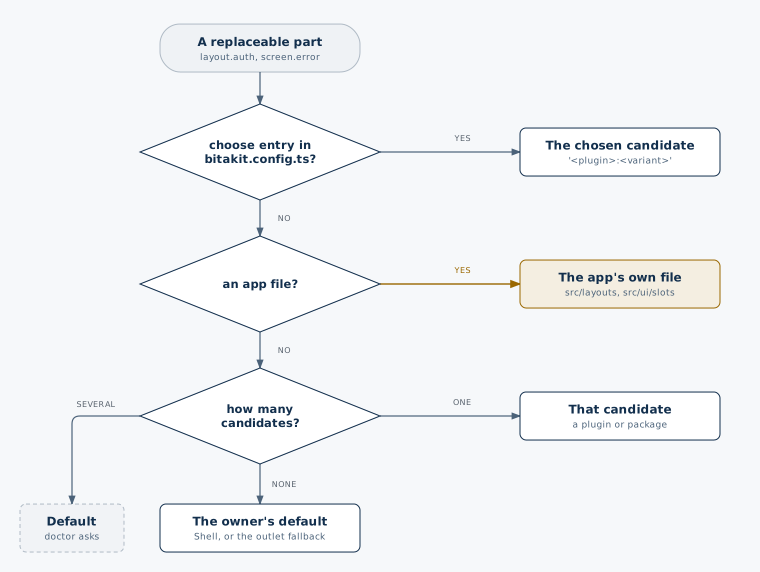
chooseinbitakit.config.tsdecides:'<plugin>','<plugin>:<variant>'or'<variant>'.- Otherwise the app's own file wins.
- Otherwise the only candidate renders.
- Several candidates and no decision: Shell's default renders and the console names them.
import { defineBitaKit } from '@bitakit/discovery';

export default defineBitaKit({ choose: { 'layout.auth': 'split' } });
Other parts you can replace
| Part | File |
|---|---|
| The frame of every normal page | src/layouts/app.tsx, composed from AppShell parts |
| The error page frame | src/layouts/error.tsx |
| Access denied, loading | ui/slots/screen.forbidden.tsx, screen.loading.tsx |
| Better Auth sign-in, sign-up and more | ui/slots/screen.sign-in.tsx and the other screen.* parts of @bitakit/better-auth-ui |
| A part of your own feature | slots/<part>.ts with policy: 'single' |
Delete a replacing file and the default returns. The full list of regions is in Layouts and regions.