

Extend another plugin
Add an Action to another plugin's toolbar, a widget below its list or in the app header, from your own folder.
Goal: a notes feature that other plugins extend, an Action in its toolbar, a feed below its list and a count in the header, while the notes folder stays unchanged after the first step.
You need an app with Shell. The finished code is the Workspace sample,
where notes owns the feature and export and activity extend it.
How it works
The owner declares a slot, a named place, and renders it once. Other plugins fill it from
their own folders. accepts: 'actions' takes Actions, rendered as the owner's buttons;
accepts: 'component' takes React components.
How plugins extend a page
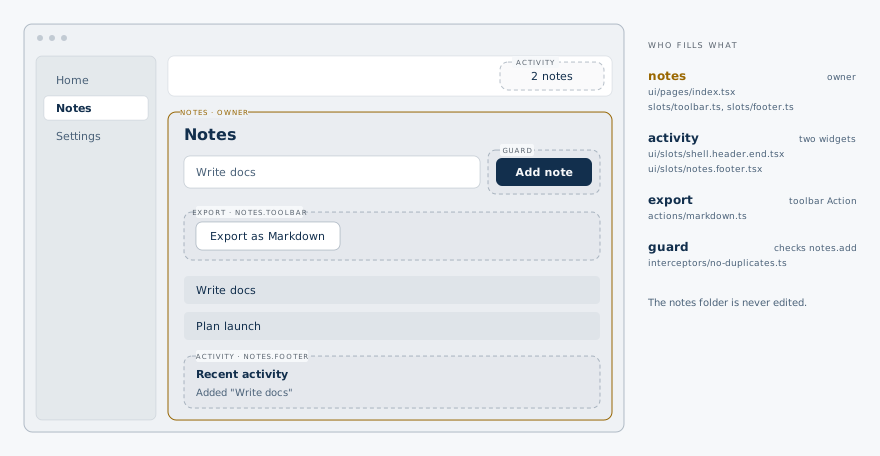
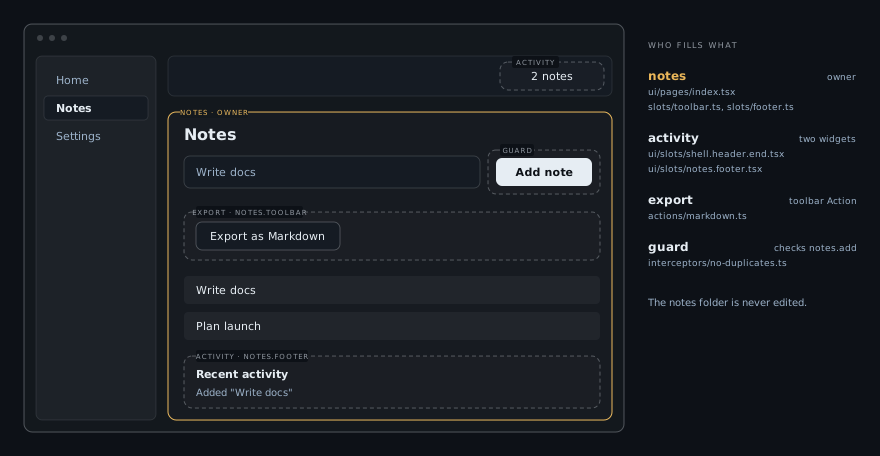
Declare the slots (owner)
import { defineSlot } from '@bitakit/core';

// Other plugins add buttons above the list by naming `notes.toolbar` in an Action's `slots`.
export default defineSlot({ accepts: 'actions' });import { defineSlot } from '@bitakit/core';
// Other plugins add widgets below the list with a `ui/slots/notes.footer.tsx` file.
export default defineSlot({ accepts: 'component' });The paths name them notes.toolbar and notes.footer.
Render them (owner)
A component slot is one line. An actions slot uses useSlot with the owner's own button style.
import { Action, PluginSlot, useSlot } from '@bitakit/ui';
import { Button } from '@bitakit/ui/components';

/** Renders the Actions other plugins placed in `notes.toolbar`. */
function Toolbar() {
  const toolbar = useSlot('notes.toolbar');
  if (toolbar.error) throw toolbar.error;
  if (!toolbar.items.length) return null;
  return (
    <div role="group" aria-label="Note tools" className="flex flex-wrap gap-2">
      {toolbar.items.map((item) => (
        <Action key={item.key} id={item.action}>
          <Button variant="outline" size="sm" />
        </Action>
      ))}
    </div>
  );
}

// In the page: <Toolbar /> above the list, <PluginSlot name="notes.footer" /> below it.
From here on, the notes folder does not change.
Add an Action to the toolbar (another plugin)
The export plugin places its Action in notes.toolbar. requires turns a missing
notes.list service into a clear startup error.
import { defineAction } from '@bitakit/core';

export default defineAction({
  title: 'Export as Markdown',
  // Placed in the toolbar the notes plugin declares and renders.
  slots: ['notes.toolbar'],
  // notes.list belongs to another plugin; listing it turns a missing service into a startup error.
  requires: ['notes.list'],
  enabled: ({ services }) => services.notes.list.state.get().notes.length > 0,
  execute: ({ services }) => {
    const notes = services.notes.list.state.get().notes;
    const text = notes.map((note) => `- ${note.title}`).join('\n');
    const link = document.createElement('a');
    link.href = URL.createObjectURL(new Blob([text], { type: 'text/markdown' }));
    link.download = 'notes.md';
    link.click();
    URL.revokeObjectURL(link.href);
    return notes.length;
  },
  success: ({ result }) => `Exported ${result} notes`,
});
Add a widget below the list (another plugin)
A file in ui/slots/ named after the target slot fills it. Your own plugin name is not part
of the file name.
'use client';
import { useServiceState } from '@bitakit/ui';

// Fills the `notes.footer` slot that the notes plugin renders below its list.
export default function ActivityFeed() {
  const entries = useServiceState('activity.feed', (state) => state.entries, []);
  if (!entries.length) return null;
  return (
    <section aria-label="Recent activity" className="text-sm text-muted-foreground">
      <h2 className="font-medium text-foreground">Recent activity</h2>
      <ul>
        {entries.map((entry, index) => (
          <li key={index}>{entry}</li>
        ))}
      </ul>
    </section>
  );
}
The feed's data comes from an event; see React to another plugin.
Add a widget to the app header
Shell's own slots work the same way. shell.header.end is the right side of the header.
'use client';
import { useServiceState } from '@bitakit/ui';

// A widget in Shell's header that reads another plugin's service; 0 until notes is ready.
export default function NoteCount() {
  const count = useServiceState('notes.list', (state) => state.notes.length, 0);
  return <span className="text-sm text-muted-foreground">{count} notes</span>;
}
Check it
npm run typecheck rejects a slot name nobody declares. npx bitakit slots lists every slot
with its contributions. Open Notes, add a note: Export as Markdown appears above the
list, the header counts the notes. Delete the export folder and only its button disappears.
Where else you can add things
| Place | Slot | Accepts |
|---|---|---|
| Sidebar or top menu | shell.navigation | Actions |
| Header buttons | shell.toolbar | Actions |
| Header regions | shell.header.start, .center, .end | component |
| Above or below every page | shell.content.before, shell.content.after | component |
| Sidebar header and footer | sidebar.header, sidebar.footer | component |
| Below a Settings page | app-preferences.page.after | component |
A slot with a payload (for example a row ID) passes it to every contribution; see the Slot reference.