

Why BitaKit?
Spend your tokens and time on features, not on the app around them. What BitaKit gives you, what it saves on a Todo app, and when it is not the right tool.
Every app needs the same infrastructure around its features: an app frame with navigation and search, central management of UI actions and their state across every control, guards and confirmation before operations run, interception of operations, app settings and plugin configuration that persist, theming, layouts and error screens. Usually you, or your coding agent, write it again for each app and touch it again for each feature.
BitaKit provides those shared mechanisms so feature work can stay local. This page compares the code and coordination that approach can save, the assumptions behind the estimates, and the cases where the structure is not worth adding.
For the plugin model and where BitaKit fits in your stack, start with the Introduction.
What you get
Fewer tokens, less time, lower cost
Your agent writes the feature, not the infrastructure. A third of the AI cost on a Todo app, and the gap widens with every feature you add.
A complete app with little effort
One command gives you the app frame, settings, theming and search. Everything stays configurable.
Central UI action and state management
Define an operation once. Every control bound to it, in menus, toolbars, pages, search and shortcuts, shares its state, guards, confirmation and feedback.
Guards and interception
Decide when an operation may run, and gate or observe operations you do not own, from your own folder.
Anyone can extend your app
A plugin adds pages, Actions, settings and UI in the places you offer, without editing your code.
Work together without conflicts
Each developer or agent owns a folder. There is no shared menu, route list or registry to edit.
Change or replace any part
A layout, a screen, a theme or another plugin's part is one file of yours.
Made for coding agents
One place per task, generated types and checks that name the fix.
The same Todo app, two ways
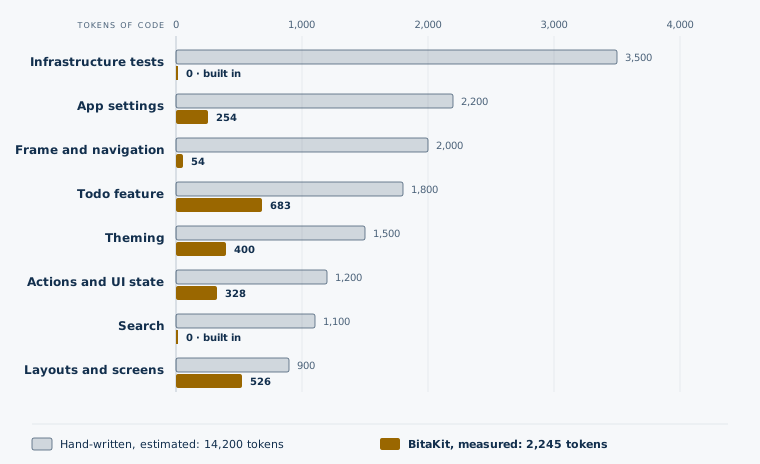
Take a Todo app with what users expect today: the list; operations whose state stays in sync everywhere they appear, with guards, a confirmation before deleting and feedback when they finish; an app frame with navigation; Mod+K search; app settings with their pages; theming; a sign-in layout and 404 and error screens.
The same Todo app, two ways
| Hand-written (estimate) | With BitaKit | |
|---|---|---|
| Code your agent writes | ≈14,200 tokens | 2,245 tokens (measured) |
| Agent session, reading and retries included | ≈710,000 tokens | ≈210,000 tokens |
| AI cost at Claude Opus 5.5 list prices | ≈$4.00 | ≈$1.20 |
| A developer without an agent | 2–3 days | 2–4 hours |
| Shared files every new feature edits | Menu, search, settings pages, routes | None |
| Infrastructure tests to write and maintain | UI state, guards, settings, theming, search | None: the packages ship with 555 tests |
That is the first app. The real difference comes after it.
The gap grows with every feature
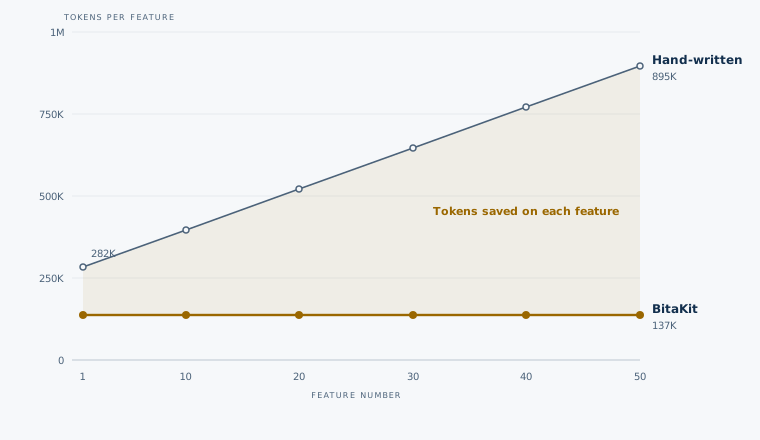
In a hand-written app every new feature adds its entry to the shared files: the menu, the routes, the search index, the settings page. So each next feature has more shared code to read, edit and test again, and its agent session costs more than the last. A BitaKit feature is its own folder: the 50th costs about what the first did.
The next feature, as the app grows
| After… | Next feature, hand-written | Next feature, BitaKit | All sessions so far, hand-written | All sessions so far, BitaKit |
|---|---|---|---|---|
| 10 features | ≈395K tokens | ≈137K tokens | ≈4.1M tokens, ≈$23 | ≈1.6M tokens, ≈$9 |
| 20 features | ≈520K tokens | ≈137K tokens | ≈8.7M tokens, ≈$49 | ≈3.0M tokens, ≈$17 |
| 50 features | ≈895K tokens | ≈137K tokens | ≈30M tokens, ≈$170 | ≈7.1M tokens, ≈$40 |
At 50 features the next one costs about 6.5 times as much hand-written, and the project so far about 4 times as much. The table counts tokens only. With several developers or agents, the same shared files also become merge conflicts, longer reviews and regressions in features nobody touched; with BitaKit each of them works in a folder of their own.
How we estimated
These are rough numbers to show the size of the difference, not a benchmark.
- BitaKit column: measured from the sample apps' files (Todo, Settings, Theme and Layouts) with the open o200k tokenizer.
- Hand-written column: our estimate for the same capabilities on Next.js with standard libraries: shadcn/ui, next-themes, sonner, cmdk and a persisted store. Both columns leave out the framework scaffold.
- Agent session: about 50 tokens processed for every token of code kept (reading files,
context resent each turn, checks and retries). BitaKit's agent also keeps the rules it reads,
AGENTS.mdand the skill entry (about 3,900 tokens), in context for about 25 turns. - Cost: Claude Opus 5.5 list prices, $4 per million input and $20 per million output tokens, with 90% input. Prompt caching lowers both columns.
- The next feature: an agent session costs about 25 turns times what it keeps in context.
With BitaKit that is measured and stays flat: the rules, a complete feature (the Workspace
notesplugin, about 1,400 tokens) and itsAGENTS.md. Hand-written, we estimate the feature with its tests (3,000 tokens), a similar feature read as the pattern (3,000) and the shared menu, route, search and settings files it edits (5,300 at the start, plus 500 per feature). The turns are equal on both sides, although checks that name the fix usually shorten BitaKit sessions.
Run npm run measure:onboarding in the repository to reproduce every number.
What goes wrong in large apps, and what BitaKit does about it
Large apps built with coding agents run into the same problems again and again. Research on long contexts shows that models grow less reliable as their input gets longer, GitClear's analysis of changed code found that copy-pasted code now exceeds moved, refactored code, and the Thoughtworks Technology Radar warns that agents accelerate drift from the intended architecture by copying whatever patterns they find. BitaKit answers each of these with a mechanism, not a convention someone has to remember. Goals and research explains each goal with its sources.
| Problem in a large app | What BitaKit does |
|---|---|
| The agent has to read more and more of the codebase, and gets worse at it | A task fits in one plugin folder, its AGENTS.md and the contracts it uses. The skill opens its references only for the task at hand. |
| Every feature reimplements UI state, guards, confirmation, feedback, stores and settings forms | These exist once, in tested packages. An Action declares enabled, confirm and success; a setting is one line in settings.ts. |
| Agents copy whatever pattern they find, so the architecture drifts | There is one shape per kind of thing (defineAction, defineSettings, slots). npx bitakit add writes it in the right place; types reject wrong IDs. |
| Parallel developers and agents edit the same menu, routes and registries | There is no shared registry. Features meet only through services, events, slots and settings. |
| Features reach into each other's internals and shared stores | Services have typed contracts (provides, requires); npx bitakit doctor names a contract nobody provides. |
| A rule over all operations (duplicates, permissions, tracing) is patched into every handler | An interceptor in its own folder gates or observes any Action or service call. |
| One broken component takes the whole page down | <PluginSlot> renders each entry inside its own error boundary; the rest of the page keeps working. |
| Vendor SDKs for auth, data or content spread through every feature | Integrations are plugins behind contracts, so features use auth or a data service, not the vendor's SDK. |
| Features look, behave and read differently | One frame, theme tokens and layouts for all; each plugin ships its own translations, merged by discovery. |
| Nobody knows any more what the app contains | npx bitakit info --json lists every plugin, Action, service, event, slot and setting; npx bitakit slots shows where UI can go. |
A complete app that stays flexible
One command creates a Next.js app with the app frame, a settings area, light and dark theming, Mod+K search and, if you like, the Todo sample:
npm create @bitakit/app@latest my-app -- --framework next --sample --yesNone of it is a fixed template. Each part is a package with settings, slots and replaceable
screens, so you change it from your own files instead of forking it. Every plugin you add plugs
into the same frame: one navigation Action puts its page in the menu and in search, and its
settings.ts gets a settings page.
One action model for the whole UI
Most UI work is not drawing a control. It is keeping operations and their state consistent: whether an operation is available, visible, running or done, whether it needs a confirmation, what the user sees when it succeeds or fails, and whether it may run at all. Hand-written, that state is copied into every menu entry, toolbar, page and shortcut that triggers the operation, and it drifts apart.
In BitaKit an Action owns it once:
| Concern | Declared once in the Action, applied everywhere |
|---|---|
| UI state | title, icon, enabled, visible, recomputed when the services they read change |
| Execution state | Pending state and concurrency, shared by every bound control |
| Guards and confirmation | enabled and visible rules, confirm before the operation runs |
| Feedback | success and failure messages |
| Placement | slots puts it in menus and toolbars; pages bind it with <Action>; search finds navigation Actions |
| Interception | Interceptors in other folders gate or observe Actions and observe service calls |
Every control bound to the Action, wherever it is, reads the same current state, so a rule
changed in one file changes everywhere. App settings work the same way: declared once in
settings.ts, persisted through one storage contract and given a generated page. Plugins read
their configuration from src/configs/<plugin>.ts.
One Action, every control
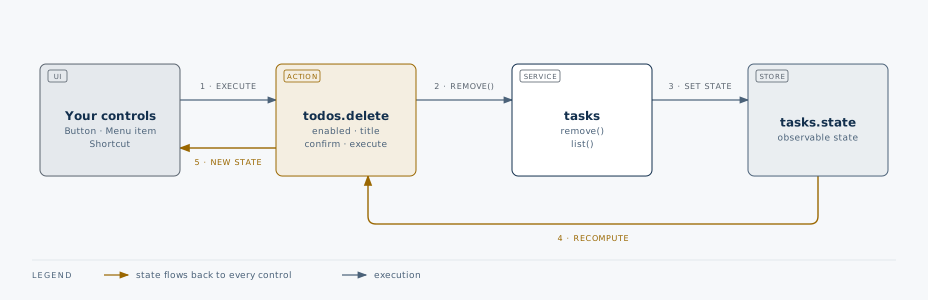
See Actions and Run an operation.
Anyone can extend your app
A plugin offers places where others may add UI, called slots, and announces what happened through events. Another plugin, written by you, a colleague, an agent or a package author, fills those places from its own folder. The owner's code does not change.
How plugins extend a page
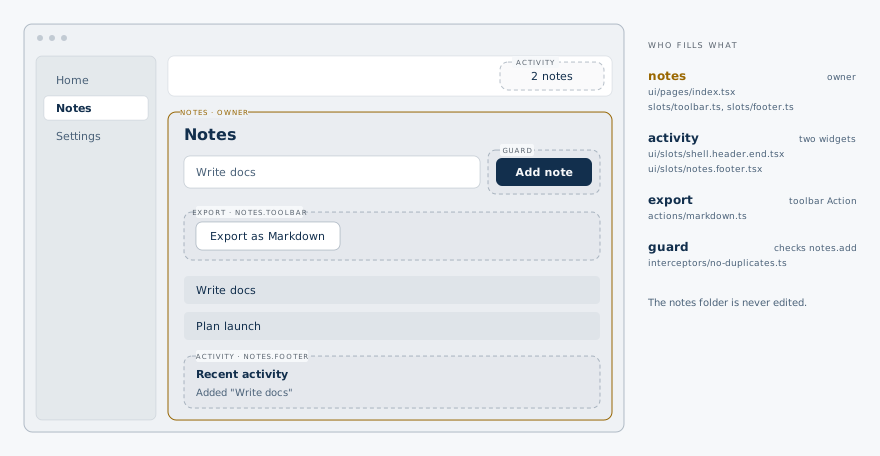
The Workspace sample has four plugins. Three of them extend the first without editing it:
| Plugin | What it adds | Files | Tokens |
|---|---|---|---|
notes | The feature: service, event, setting, two slots, page, search source | 10 | 1,359 |
activity | A feed below the notes and a count in the header, from the notes.changed event | 3 | 357 |
export | An "Export as Markdown" Action in the notes toolbar | 1 | 207 |
guard | Skips duplicate notes and traces every notes call | 2 | 202 |
Tokens per plugin in the Workspace sample
notesowns the feature1,359 · 10 filesactivityfeed and header count357 · 3 filesexportone toolbar button207 · 1 fileguardtwo interceptors202 · 2 files
Delete activity, export or guard and the app still works without it. See
Extend a plugin.
Work together without conflicts
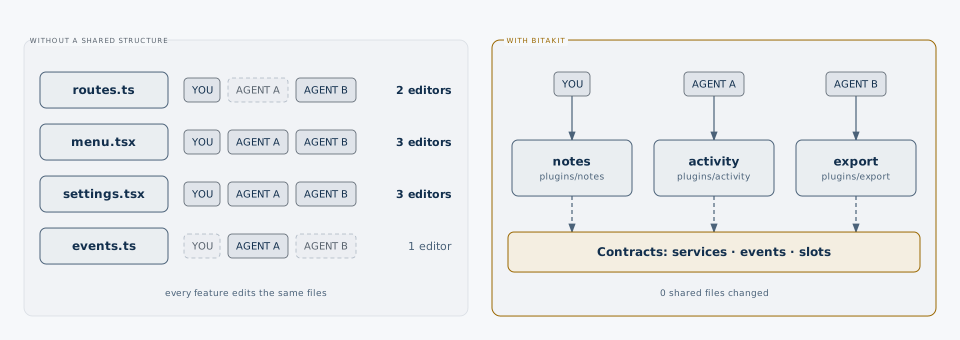
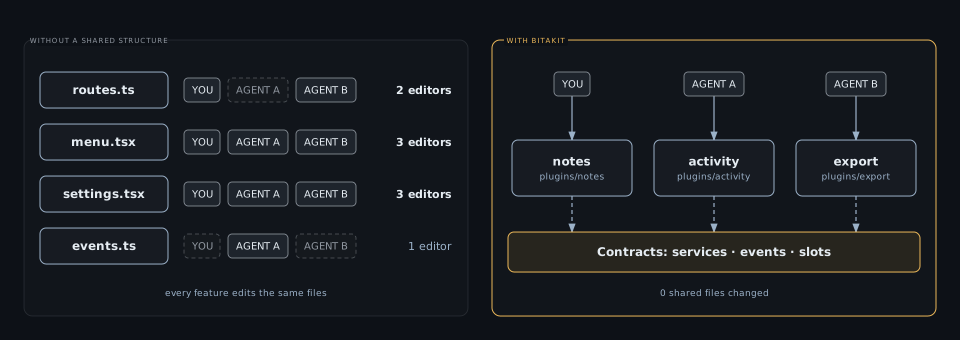
Every feature lives in src/plugins/<name>/, and the path is the ID: notes/actions/add.ts is
the Action notes.add. Features meet only through contracts: a service, an event, a slot or a
setting. So each developer or agent concentrates on one folder:
Three people, one app
src/plugins/
├── notes/      owner: the feature
├── activity/   listens to notes.changed, fills notes.footer
├── export/     adds an Action to notes.toolbar
└── guard/      intercepts notes.add
There is no route list, menu file or registry that everyone edits at the same time, so pull
requests rarely touch the same lines. npm run typecheck catches a misspelled ID across folders,
and npx bitakit doctor reports a slot or service that nobody provides.
Change or replace any part
Replacing a part never means editing the code that renders it. You add a file, and BitaKit picks it:
| To change… | Add or edit |
|---|---|
| The sign-in or onboarding frame | src/layouts/<family>.tsx or a variant in src/layouts/<family>/ |
| The 404 or error screen | src/ui/slots/screen.not-found.tsx or screen.error.tsx |
| The colors | A theme in src/themes/<name>.json |
| A plugin's settings page | ui/settings/page.tsx in that plugin |
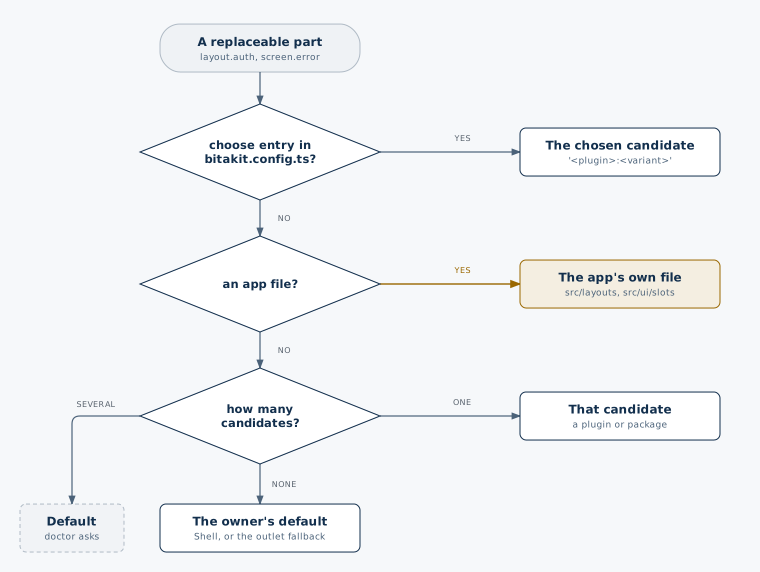
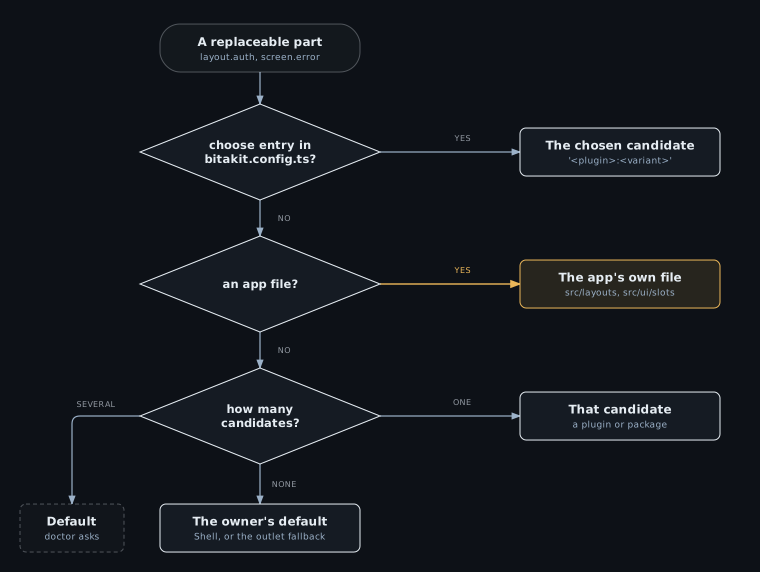
| A part another plugin renders | A candidate file, and choose in bitakit.config.ts when several fit |
Which candidate renders a replaceable part?
See Layouts and screens and Theming.
Made for coding agents
- One place per task.
AGENTS.mdmaps each task to a path: a page goes toui/pages/, a operation toactions/, a preference tosettings.ts. - Commands instead of guesses.
npx bitakit addcreates the file in the right place,npx bitakit info --jsonlists every ID,npx bitakit slotsshows where UI can go. - Checked results. Generated types and
doctorturn a wrong name into an error with the fix, not a blank screen. - Everything explains itself.
node_modules/@bitakit/<name>/AGENTS.mddescribes what each package offers, and every plugin keeps anAGENTS.mdwith its contracts and checks.
A generated app gives agents one screen of rules in AGENTS.md (about 800 tokens) and the BitaKit
skill (about 3,000 tokens, with focused references of about 25,000 tokens that it opens only for
the task at hand). See Work with AI coding agents.
What you build on
- per plugin in the Workspace sample, written by you or your agent
- 200–1,360 tokens
- of package code it runs on, covered by 555 tests
- ≈285,000 tokens
- changed when a plugin extends another
- 0 shared files
An app created with Shell, Settings and Quick Search runs on these packages. Read the token counts as sizes, not exact bills: other models' tokenizers count somewhat differently.
| Package | Source files | Lines | Tokens | Tests |
|---|---|---|---|---|
| Core (runtime, Actions, settings) | 67 | 9,633 | 81,840 | 258 |
| UI (React bindings, components) | 73 | 5,933 | 49,614 | 90 |
| Discovery (file conventions, types) | 15 | 2,903 | 28,519 | ¹ |
| Next.js adapter | 9 | 112 | 1,020 | 31 |
| Shell (frame, layouts, theming, notifications) | 34 | 4,495 | 43,377 | 48 |
| App Preferences (Settings pages) | 40 | 3,506 | 27,772 | 48 |
| Quick Search | 18 | 1,420 | 11,230 | 16 |
| CLI (add, doctor, slots, info) | 15 | 4,187 | 41,544 | 64 |
| Total | 271 | 32,189 | ≈285,000 | 555 |
¹ Discovery's tests run in Core's suite.
A hand-written version for one app would be smaller than general packages, but every part it needs is code an agent would otherwise write, read back in later sessions, debug and test. Here it is installed, tested and documented. You keep your framework: Next.js still owns routing, rendering and deployment, and a plugin is plain TypeScript and React in your repository.
When BitaKit is not the right tool
- A small app with one or two screens. You can still start with BitaKit, but the benefit grows with the number of features and contributors.
- You need isolation between untrusted plugins. Plugins are trusted code in the same app. A failing slot component is contained, but plugins are not sandboxed.
- Server-side plugins. Plugins run in the client app today; server plugins are planned.
- Another UI framework. The React bindings and adapters cover Next.js and, experimentally, TanStack Start.