

Sample apps
Six complete apps, from a counter to four plugins working together. Run one, read its few files, then change it.
Each sample is a normal Next.js app created with @bitakit/create-app, plus the few files
that teach one idea. They live in
examples/ in the repository and use
the published packages, so you can copy one folder anywhere and run it.
| App | You learn | Plugins |
|---|---|---|
| Counter | A plugin with a page, a service and two Actions | 1 |
| Todo | Lists, Actions with input, confirmation and messages, the Shell frame | 1 |
| Settings | Plugin and app settings, the generated Settings page, a custom page body | 1 |
| Theme | App themes as JSON files and switching them | 1 |
| Layouts | Layout families, a new family, your own not-found and error screens | 3 |
| Workspace | Events, slots, interceptors and a search source across four plugins | 4 |
Run a sample
Download or clone the repository, open a sample folder and install it:
cd examples/todo
npm install
npm run dev
Open the address the terminal prints. Working with a coding agent? Run
npx bitakit init --update-agent-files once in the sample folder: it installs the BitaKit
skill next to the generated AGENTS.md.
Every plugin folder in a sample has its own AGENTS.md: what the plugin owns, which contracts
it offers or uses from other plugins, and how to check it. Read those first; they are written
for people and coding agents alike.
Every sample is checked before a release: it installs from freshly packed packages, passes
typecheck, doctor and a production build, and a browser runs through its README.
Counter
The smallest feature. Start here if BitaKit is new to you.
| File | Role |
|---|---|
src/plugins/counter/ui/pages/index.tsx | The page at /counter; binds both buttons to Actions |
src/plugins/counter/services/value.ts | The service counter.value: the count and two methods |
src/plugins/counter/actions/increment.ts | counter.increment, disabled at 10 |
src/plugins/counter/actions/reset.ts | counter.reset, disabled at 0 |
Try it: open /counter, press Increment until it stops at 10, then Reset. The
disabled rule lives in the Action, so every button bound to it follows.
Read next: the Counter lessons build this app one file at a time.
Todo
One plugin inside the Shell frame: sidebar, header, toasts and Quick Search.
| File | Role |
|---|---|
src/plugins/todos/services/list.ts | The list and its operations |
src/plugins/todos/actions/add.ts | An Action with input, disabled while the input is empty |
src/plugins/todos/actions/toggle.ts | One Action for every row: the input is the todo ID |
src/plugins/todos/actions/clear-done.ts | Confirmation and a success message |
src/plugins/todos/actions/open.ts | The sidebar entry, also a Quick Search destination |
Try it: add two todos, mark one Done, press Clear completed and confirm. Press Mod+K and type "Todos".
Read next: Run an operation from a control.
Settings
A Greeting page driven by four settings and an app-wide company name.
| File | Role |
|---|---|
src/plugins/greeting/settings.ts | Text, switch, select and radio settings; generates the page |
src/settings.ts | An app-wide setting with a plain key |
src/plugins/greeting/ui/pages/index.tsx | Reads settings with useSetting; one inline SettingField |
src/plugins/greeting/ui/settings/page.tsx | Replaces the body of the generated Settings page |
src/plugins/greeting/actions/reset.ts | Resets the settings from an Action |
Try it: switch on Formal greeting on the page, set your name in All greeting settings, reload: the choices stay in this browser.
Read next: Add settings.
Theme
Two app themes as JSON files, switched with Shell's own Action.
| File | Role |
|---|---|
src/themes/ocean.json | Only the primary color pair and the corner radius |
src/themes/sunset.json | Surfaces, borders, radius and a serif font |
src/plugins/gallery/ui/pages/index.tsx | Buttons bound to shell.selectTheme with { key: 'app:<id>' } |
Try it: open Theme gallery, press Use Sunset, reload, then Use Ocean.
Read next: Themes and appearance.
Layouts
Pages in different frames, and the app's own error screens.
| Page | Frame | File |
|---|---|---|
/account/login | auth family, the app's split variant | src/layouts/auth/split.tsx |
/welcome | A new onboarding family | src/layouts/onboarding.tsx |
/lab | Shell's full-page family | export const layout = 'full-page' |
/lab/crash | Breaks on purpose: the app's error screen | src/ui/slots/screen.error.tsx |
/nowhere | Unknown page: the app's not-found screen | src/ui/slots/screen.not-found.tsx |
Try it: open each link on the start page. Delete one of the files and Shell's default returns.
Read next: Use a custom layout or screen.
Workspace
Four plugins in four folders. notes owns the feature; the other three extend it without
editing it.
How plugins extend a page
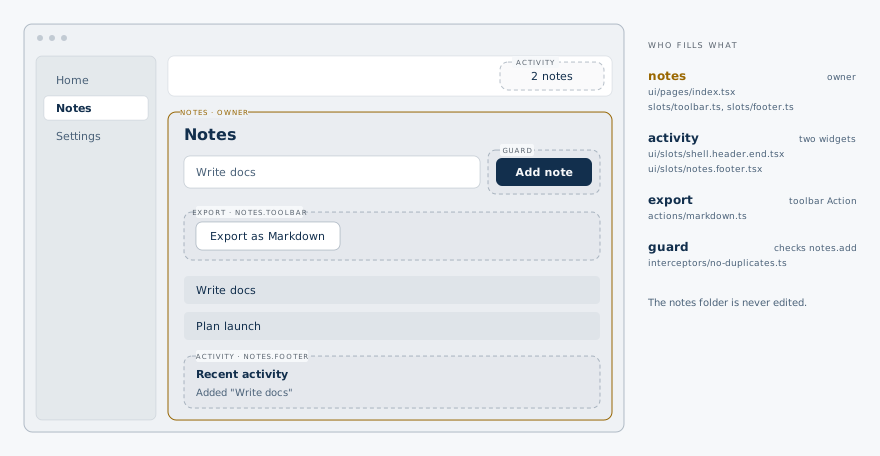
This is the shape that lets several developers or agents work on one app at once.
| Plugin | Owns | Uses from notes |
|---|---|---|
notes | Service, event notes.changed, a setting, slots notes.toolbar and notes.footer, a Quick Search source | — |
activity | A feed and a header count | Listens to notes.changed, fills notes.footer |
export | The Action export.markdown | Placed in notes.toolbar, requires notes.list |
guard | Two interceptors | Skips duplicate notes.add runs, traces notes.list |
Try it: add "Plan launch" and "Write docs", then "Write docs" again: the guard skips it. Press Export as Markdown. Press Mod+K and type "Write".
Read next: Extend another plugin · React to another plugin · Interceptors · Add a Quick Search source.