

Introduction
A composition layer for building apps with AI agents, where every feature is a self-contained plugin.
What is BitaKit?
BitaKit is a composition layer for building apps with AI agents. Every feature is a self-contained plugin in its own folder: its pages, behavior, settings and extension points live together, and features meet only through explicit contracts. A developer or a coding agent adds or extends a feature with a small, local change instead of rewiring the app.
BitaKit is not another framework. It sits on top of the one you already use, through an adapter (Next.js today, TanStack Start experimental), which keeps routing, rendering and deployment.
BitaKit is a composition layer
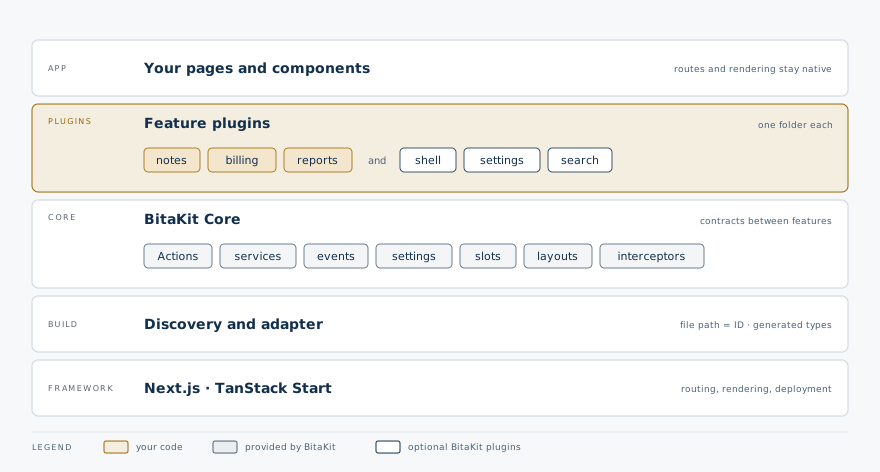
Work through predictable file conventions, or compose the same definitions directly with the TypeScript API. Both use the same plugin model and runtime.
Humans and AI agents, one structure
- The path is the ID.
src/plugins/notes/actions/archive.tsis the Actionnotes.archive;ui/pages/index.tsxin the same folder is the page/notes. - Names are checked. Generated types reject an unknown Action ID, service, event, setting
key or slot name in
npm run typecheck. - The same commands.
npx bitakit addcreates files in the right place,npx bitakit infolists every ID, andnpx bitakit doctorreports wiring problems with the fix. - Written-down rules. Apps created with
@bitakit/create-appor wired withnpx bitakit initcarry a one-screenAGENTS.mdthat says where each task goes. Every plugin folder fromnpx bitakit add pluginand every@bitakit/*package keeps its ownAGENTS.mdwith its contracts and checks; theCLAUDE.mdbeside each one only imports it.
What BitaKit is not
| BitaKit is not… | Instead… |
|---|---|
| A framework or a router | Your framework keeps routes, rendering and deployment; one catch-all route renders plugin pages. |
| A component library | Core has no UI. @bitakit/ui/components is an optional set of standard components. |
| A sandbox | Plugins are trusted code in the same app. A failing plugin is reported at startup and a failing slot component is contained, but plugins are not isolated from each other. |
| A backend | Plugins run in your client app. Server-side plugins are planned, not shipped. |
Is it a fit?
BitaKit is useful when several features need shared conventions. A small page can stay small: you do not need every capability, an optional UI package or a full manifest to start. See Why BitaKit? for the benefits, measured examples, estimation assumptions and tradeoffs before choosing it for a project.
Files first, APIs when you need them
If you know file-based conventions from frameworks such as Next.js, the idea will feel familiar: the file's location tells BitaKit what it contributes. In an app configured with the BitaKit framework adapter and provider, add a supported file with its default export; discovery generates the imports and types. You do not maintain a registration list for each new file.
src/plugins/notes/
├── actions/open.ts      → Action: notes.open
├── settings.ts          → Notes preferences
└── ui/pages/index.tsx   → Page: /notes
These are optional additions, not a required scaffold. The same conventions give developers and
AI coding agents a shared map: Actions go in actions/, services in services/, and owned slot
definitions in slots/.
| How you prefer to work | How the same Action joins the Notes plugin |
|---|---|
| File conventions | Put a defineAction default export in src/plugins/notes/actions/open.ts. |
| Programmatic API | Pass that Action definition as open in definePlugin({ id: 'notes', actions: { open } }), then include the plugin in your host composition. |
Discovery runs during development and builds. It registers definitions; a page, Action binding or mounted slot still determines where UI appears.
Read more: file conventions and automatic discovery → · Compose plugins through the API →
How the pieces fit
- Keep each feature together. Discovery connects its files and generates imports and types.
- Extend through declared places. Plugins contribute Actions or UI to slots the owner exposes.
- Share the runtime, keep your framework. Core owns execution, state and cleanup; React bindings and optional visual plugins connect that behavior to your application.
Read more: architecture and package boundaries →
Clear ownership, explicit contracts
Each developer or AI coding agent can work inside the feature it owns. Plugins connect through service contracts, declared events and named slots, so another feature can use or extend them without editing their internal files.
Features meet at their contracts
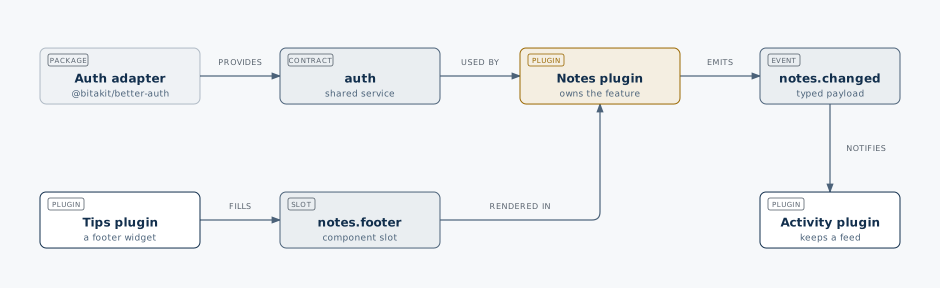
For example, Activity can listen to a Notes event and Tips can add a widget to the Notes footer. Neither needs to rewrite the Notes page or Core. Keeping changes local reduces accidental coupling and the risk of breaking shared foundations; compatible contracts and tests still matter.
Read more: shared service contracts → · Events → · Slots →
Try adding a piece
Choose a learning step, then try its examples one piece at a time. Switch between Preview and Code in the same area to see the result and its source. Preview interactions stay in Preview; the Code tab shows the selected example’s source. Your added pieces stay until you reset.
Explore in three steps
Examples for step 1
First name your plugin and describe its purpose. Then add its page, Actions and settings. The plugin can live inside your app or in a standalone package.
Plus adds a piece. A check means it is already added; select it again to inspect it.
Create a plugin
The Notes plugin is defined. It has an identity and a purpose; its page comes next.
App sidebar
No Notes link yet
shell.navigation
Notes plugin
Capture and organize workspace notes.
Your plugin page
Page placeholder. Add a page to give this plugin a screen.
notes · Plugin defined; no page added yet.
How these examples build on each other
Selections add pieces to the same illustrative app. Switch between Preview and Code to inspect the selected example; Reset starts again.
Add a page before linking to it from navigation.
Add note state before the toolbar Action; the service owns the notes it creates.
Start here
Create an app
Four steps with npm, pnpm, Yarn or Bun, then a Counter one idea at a time.
Open a sample app
Six complete apps, from a counter to four plugins working together.
Follow a how-to guide
Settings, layouts, extending a plugin and more, each with tested code.
These guides describe the 0.2 API in this checkout. Keep the generator and BitaKit packages on matching versions. The local package workflow runs this source without requiring a published release. TanStack Start support remains experimental.